Regulation library · HazMat 101
Ten columns, thousands of entries, zero forgiveness.
Every hazmat shipment in the United States starts at the §172.101 Hazardous Materials Table. Read it right and the rest of the HMR falls into place. Read it wrong and the error propagates through papers, packages, placards — and penalties.
Key sections at a glance
Col. 2
Proper Shipping Name
Col. 3
Hazard Class / Division
Col. 4
UN/NA Identification Number
Col. 5
Packing Group
Col. 7
Special Provisions
Col. 8
Packaging Authorizations
How the table works
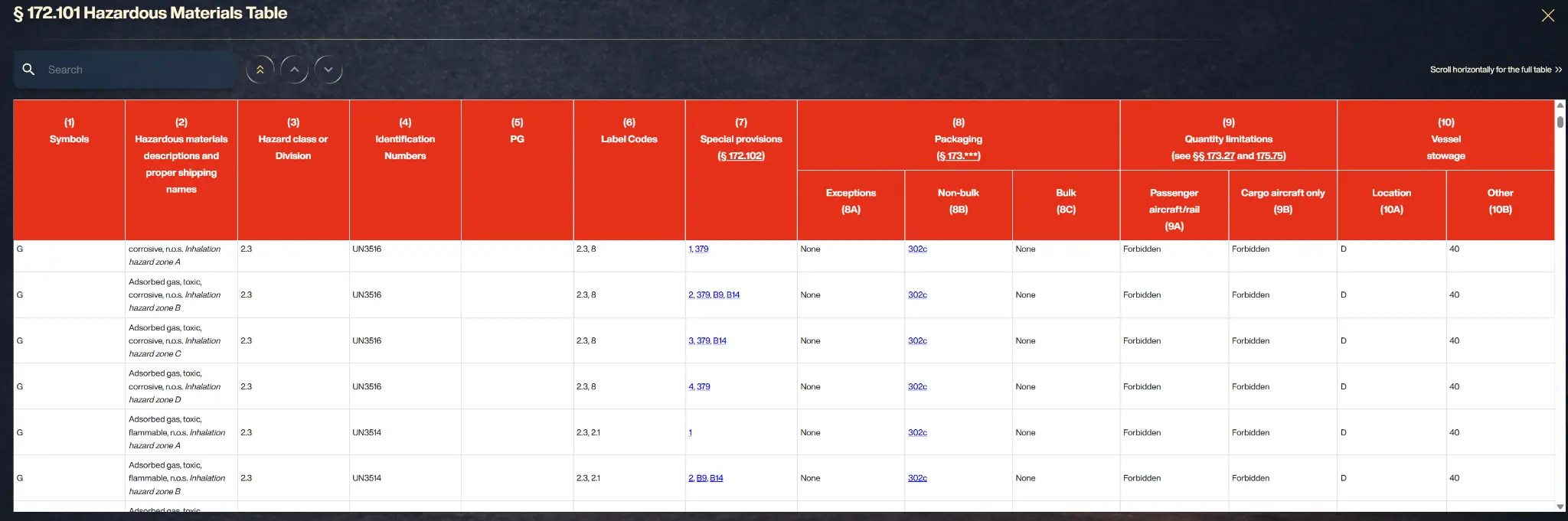
Each row of the table is a proper shipping name; each of the ten columns answers a compliance question. Column 1 flags special applicability (like domestic-only or international designations), Column 2 gives the proper shipping name, Column 3 the hazard class or division, Column 4 the UN/NA identification number, Column 5 the packing group, Column 6 the required label codes, Column 7 the special provisions, Column 8 the authorized packaging sections (exceptions, non-bulk, bulk), Column 9 quantity limits for passenger and cargo aircraft/rail, and Column 10 vessel stowage requirements.
The table is also a switchboard: Column 7's special provisions and Column 8's packaging references send you to other parts of the HMR, each with its own requirements. A single entry can implicate a dozen sections across Parts 172, 173, and 178.
Why print fails here
In print, the table spans hundreds of oversized pages where a single row continues across a spread, and checking one material means finger-tracing columns while flipping to special provisions in a different part of the book. It is, by wide agreement among the people who use it, one of the hardest documents in the CFR to read — and one where transcription errors have direct enforcement consequences.
The HazMat 101 Tool
RegLogic's HazMat 101 Tool (Essentials plan) turns the table into a search experience: type the material, see the full regulatory profile — class, ID, packing group, labels, packaging authorizations, quantity limits, stowage — with special provisions and referenced sections expanded in place. It's the difference between navigating a spreadsheet the size of a phone book and asking a question.
How to read the 172.101 table step by step
Step 1: Find the proper shipping name in Column 2. Names are alphabetical; italicized entries are not valid for shipping papers — they are cross-references. Step 2: Confirm the hazard class in Column 3 matches your material classification per Part 173. Step 3: Record the UN/NA number from Column 4 — this goes on papers, packages, and placards. Step 4: Note the packing group from Column 5 (I, II, or III) — it determines packaging performance level.
Step 5: Check Column 6 for required label codes. Step 6: Read Column 7 special provisions — each code in 172.102 may add, remove, or modify requirements. Step 7: Column 8 gives three packaging references: (A) exceptions, (B) non-bulk, (C) bulk. Step 8: Column 9 sets quantity limits for air and rail. Step 9: Column 10 governs vessel stowage. Miss any column and the shipment is non-compliant.
RegLogic vs. raw CFR: reading the table
In the raw eCFR or print edition, the table is a continuous multi-hundred-page spread with no search capability. Cross-references to special provisions and packaging sections require separate lookups in different parts of the regulation.
In RegLogic HazMat 101 Tool, you type the material name or UN number, get the complete row with all ten columns displayed clearly, and every cross-reference is hyperlinked and expandable in place. No page-flipping, no ruler-tracing, no transcription errors.
Common mistakes when using the hazmat table
The most frequent errors: (1) Using an italicized entry as the proper shipping name — italicized names are cross-references only. (2) Ignoring the plus sign (+) in Column 1 — it means the name, class, and packing group must be used exactly as shown. (3) Missing special provisions in Column 7 that override standard requirements. (4) Confusing non-bulk and bulk packaging columns in Column 8.
Each error triggers independent violations under 49 CFR. A single misclassified shipment can generate penalties exceeding $500,000 when DOT counts per-package, per-day, per-violation.
Read HazMat §172.101 Table — searchable, color-coded, always current — in RegLogic.
Start HereFAQ
Common questions
What is a packing group?
A ranking of danger within a hazard class: PG I (great danger), PG II (medium), PG III (minor). It drives packaging performance requirements and appears on shipping papers after the hazard class.
What are special provisions in Column 7?
Coded exceptions and additional requirements — numeric codes for multi-modal provisions, letter-prefixed codes for specific modes — defined in §172.102. They can change packaging, quantity, or documentation requirements for a specific entry.
Which plan includes the HazMat 101 Tool?
The HazMat 101 Tool is included in the Essentials plan ($9.95/mo or $99.95/yr), alongside smart summaries, notes, and tags.
How do I look up a hazmat material in the 172.101 table?
Find the proper shipping name alphabetically in Column 2, confirm the hazard class, then read across all ten columns. In RegLogic, just type the material name or UN number.
Is the 172.101 table the same as the hazmat table?
Yes — 172.101 table, hazardous materials table, HMT, and hazmat table all refer to 49 CFR 172.101, the master lookup for every regulated material shipped in the United States.
How often does the hazmat table change?
PHMSA amends the table multiple times per year. RegLogic reflects amendments the day they publish.
Can I search the 172.101 table by UN number?
Yes — RegLogic HazMat 101 Tool accepts UN/NA numbers, proper shipping names, synonyms, and partial matches.
Get regulation updates that matter
Join safety pros getting enforcement trends, standard changes, and practical compliance guidance. No spam.